Monday, December 19, 2011

10 of the best apps for education

As iPhones, iPads, and iPod touches become more integrated in the classrooms, educators and students are seeking ways to apply them to the learning process. Applications on all of these devices can assist in current classroom processes or present innovative ways to learn.


eSchool News' Jenna Zwang has assembled a list of education “apps” for Apple devices that are noteworthy. Five are free, and the other five range in price from 99 cents to $9.99. Enjoy!


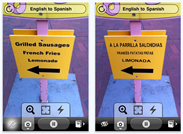
Name: Word Lens
Best for: Language Classes
Cost: Free
Features: Instantly translates signage from one language to another through the camera application
How to Use: Language teachers can use this program for scavenger hunts
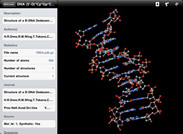


Name: Molecules
Best for: Science Classes
Cost: Free
Features: Allows users to view and manipulate three-dimensional models of different molecules
How to Use: Visual learners can see how protein molecules are composed and can download new molecules from the RCSB


Name: Blackboard Mobile Learn
Best for: Students and teachers whose campuses already use Blackboard
Cost: Free
Features: Course listings, organizations users are involved in as well as access to any readings
How to Use:Users can enroll in any classes or organizations that they have registered for and download any assignments their instructors have posted


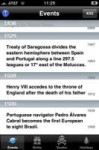
Name: Today in History
Best for: History Classes
Cost: Free
Features: Lists notable events in history as well as important figures who were born or died on a specific date
How to Use:Use for trivia quizzes or facts of the day


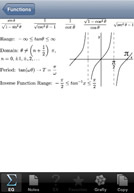
Name: Math Ref Free
Best for: Math Classes
Cost: Free
Features: A free version of Math Ref, this app offers 600 out of over 1,300 formulas, figures, tips, and examples
How to Use: Use as a formula study guide or to view graphs of different equations



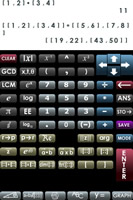
Name: PI83 Graphing Calculator
Best for: Math Classes
Cost: $0.99
Features: With over 100 math functions, the graphing calculator is a clone of the TI-83 without the $70 price tag
How to Use: Use in place of any calculator to input data, make graphs or matrices


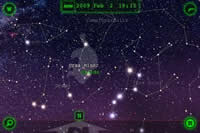
Name: Star Walk
Best for: Astronomy Classes
Cost: $2.99
Features: An astral telescope; Star Walk adapts its view to wherever the user holds it up to, highlighting constellations and planets
How to Use: Use for guided tours of the night sky or to find the location of any specific astral objects


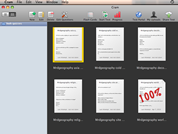
Name: Cram
Best for: Anyone in need of test prep
Cost: $3.99
Features: Both teachers and students can create flashcards and tests and import and share them with others
How to Use: Use to study for standardized tests or exams, or create study materials for students


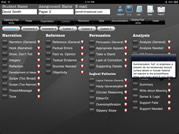
Name: Essay Grader
Best for: Teachers pressed for time
Cost: $5.99
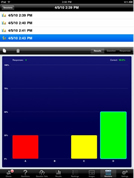
Features: Providing instant results, eClicker charts the class responses, showing which areas are understood and which need more work
How to Use: Students select a response to a question composed by the instructor and are then able to participate without fear of being wrong, since only the teacher views the results


Name: eClicker
Best for: Teachers looking for classroom feedback
Cost: $9.99
Features: Essay grader comes with a bank of pre-written comments and helps teachers cut down on grading time without writing the same comments over and over again by hand
How to Use: After assigning a grade, teachers can then eMail the grade sheet directly to the student or export it to the computer for editing and printing


Source: Jenna Zwang, eSchool News

Sunday, December 18, 2011

Wednesday, December 7, 2011

PBS LearningMedia - Digital Resources

With thousands of digital media resources to hook every student and classroom, this new service, free to educators everywhere, is your destination for curriculum planning. Dive in through a robust search that delivers what you need, when you need it.

Ecology, Grades 4-6, http://www.pbslearningmedia.org/content/idptv11.sci.life.eco.d4keco/
Discover how all living and non-living things interact in an ecosystem. Learn about biomes, the food chain, ecosystems, and more in this info-packed video. Watch now.

Amazon Rainforest, Grades K-5
http://www.pbslearningmedia.org/content/tdc02.sci.life.oate.rainforest/
One quarter of prescription medicines include rainforest plants. Understand the major threats to one of earth's most fragile ecosystems, home to thousands of species of plants and animals. Learn more.

Frozen Frogs, Grades 6-12
The common wood frog displays an amazing adaptation for surviving harsh, cold winters. See how it’s able to freeze solid without damaging its cells, and then resume function in the spring. Learn more.

Guess How Whales Hear!, Grades K-5
What does the ocean sound like to a whale? (It isn’t quiet). This resource reveals how one marine biologist used the scientific process to uncover what and how whales hear. Learn more.

Biomes, Grades 3-12
From grasslands to tundra, get the facts on biomes. This interactive features seven different biomes and includes maps, charts, photos, and essential information. Learn more.

Antarctic Ecosystem, Grades 5-12
Investigate the variety of organisms that inhabit the unique southern polar ecosystem. Explore the region's living bounty with this activity. Learn more.

Source: PBS

Saturday, October 15, 2011

Integrating Technology for Active Life-long Learning (IT4ALL)


Integrating Technology for Active Lifelong Learning (IT4ALL) is an informal volunteer network that offers free or low cost professional development workshops for educators on how to integrate technology for active lifelong learners (IT4ALL) via blended (BL) and blended online learning (BOL) courses, workshops, communities of learning, international collaborative projects, and live online events.

The workshops at IT4ALL promote lifelong, authentic, collaborative learning. This means that participants engage in collaborative social learning by doing hands-on activities, creating artifacts, and providing ongoing feedback to the other members in the discussion forms.
IT4ALL embraces a life long authentic learning methodology where participants are responsible for their own learning. The facilitators guide and facilitate the participants' learning journey. The online courses are not limited to time or place. The participants can access the content, interact with the other members and the facilitators, and work on the assignments anywhere and at anytime. However, since most of the workshops are only 4 weeks long, participants are expected to be actively involved and to do their very best to keep up with the weekly tasks.

Most of the courses and workshops at IT4ALL are free for members, but donations are always appreciated since the network is self-funded (donation box). IT4ALL is run by volunteers who are passionate about online learning. You are invited to join the team of facilitators and contribute your time and expertise.

Source: http://www.integrating-technology.org

Thursday, September 29, 2011

URLs for Parents of Children with Diverse Needs

ALLIANCE National Parent Technical Assistance Center (NPTAC)
The ALLIANCE National Parent Technical Assistance Center (NPTAC) provides Parent Centers, Parent Training and Information Centers (PTIs) and Community Parent Resource Centers (CPRCs), with innovative technical assistance, up-to-date information, and high quality resources and materials.
www.taalliance.org

Family Voices of California
Family Voices of California (FVCA) is a statewide collaborative of locally-based parent run centers working to ensure quality health care for children and youth with special health care needs.
www.familyvoicesofca.org

IMPACT
IMPACT is a California statewide all-volunteer, non-profit organization of parents, teachers and professionals serving deaf and hard-of-hearing children. Established in 1986 by 12 parents, IMPACT has a current membership of over 300 and is supported and encouraged by a host of organizations that serve the deaf community.
www.impactfamilies.org

Hands & Voices
Hands & Voices is a nationwide non-profit organization dedicated to supporting families and their children who are deaf or hard of hearing, as well as the professionals who serve them.
www.handsandvoices.org

American Society for Deaf Children
The American Society for Deaf Children supports and educates families of deaf and hard of hearing children and advocates for high quality programs and services.
www.deafchildren.org

Friday, September 23, 2011

REL Northeast & Islands - Policy Challenges Webinar: Supporting the Transition to the Common Core State Standards in Mathematics


photo
RELNEI


Policy Challenges Webinar:

Supporting the Transition to the

Common Core State Standards in

Mathematics Webinar

Thursday, October 6, 2011
3:00–4:30 PM EDT

Register

Breaking Through Barriers to Learning


Technology has expanded the learning opportunities for students across the nation - and particularly for those with special needs. Although school budgets are limited, investing in assistive technology can help special-needs students learn, while helping schools in the process.
Click here to read more.

Source: eSchool News